Start the Calibration by selecting values of Use best shot and Shots, or use default values 5 + 5.
--- **Use best shots :** Sets number of shots used to calculate the offset from true 10. Default value is 5 best shots, but can be up to 10 shots. **Shots** : Sets number of recorded shots. Maximum is 10, default number is 5. Example : Use best shots value - 5, Shots value - 10 Even if selected number of **Shots** is 10, the **Use best shots** setting will ensure that only 5 best are used for calculation of the offset. ---**If there are more shooters, use +Add shooter and see how their info appears in the upper right corner.**
**[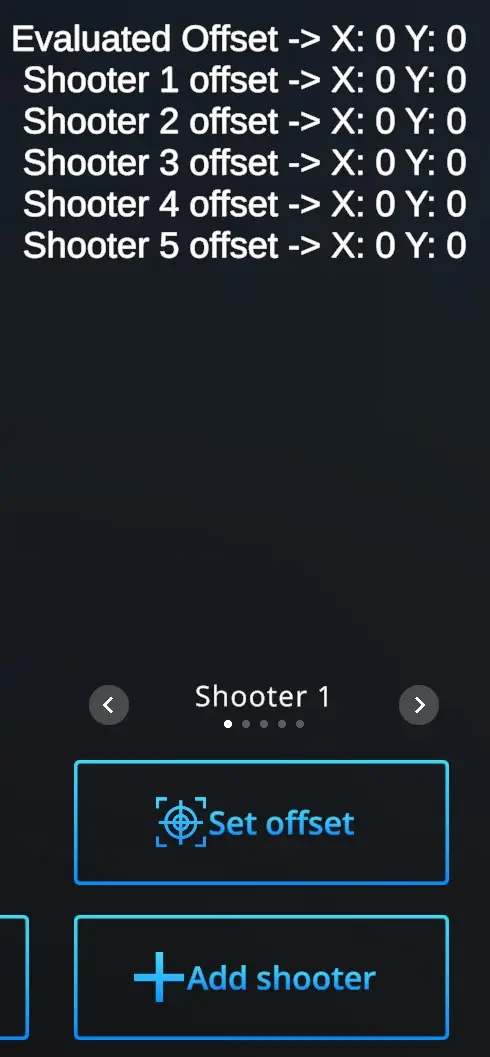](https://docs.helioninteractive.com/uploads/images/gallery/2025-07/addshooter-webp.webp)** Up to 10 Shooters can have their specific calibration data saved. The slider above Set offset selects active Shooter (Shooter 1, Shooter 2 ... Shooter 10) for whom is the calibration performed at the moment.Every time you start calibration, ensure that it is performed for the correct shooter.
**Start calibration :** Shoot at the target aiming at the center. The offset will be shown in the upper right corner on the first line as **Evaluated offset.** - you are not satisfied and want to try again - hit **Start calibration -** and perform the shots again - you are satisfied with the shot location on the target and the Evaluated offset- hit **Set offset** The offset will be shown next to the **Player 1 offset** expressed by the shift coordinates. Repeat for each of the Players.Note that each laser gun, each trainee, and each location should be calibrated separately.
**Clear offsets** : Offsets can be calibrated for each Player separately. On a slide above the Set offset button, Choose Player whom to change the offset, than hit **Clear offset** button and X=0, Y=0 appears next the the relevant Player. Then go through the Calibration process to get the new offsets. --- **Detection area :** Sets detection area of the camera. For more information, refer to XXX --- **Home** - returns to the Home page with drill selection. ---