# CQB Arena 1 & 2

[![CQBHeader.webp](https://docs.helioninteractive.com/uploads/images/gallery/2025-07/scaled-1680-/cqbheader.webp)](https://docs.helioninteractive.com/uploads/images/gallery/2025-07/cqbheader.webp)

<p class="callout info">Drills Description:</p>

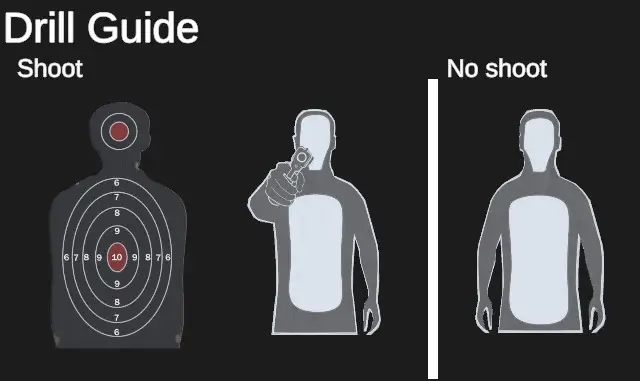
CQB Arena 1&amp;2 present dynamic drill in a confined indoor warehouse with open rooms and narrow corridors. Silhouette targets appear unexpectedly from various positions. Some targets are armed threats; others are non-threats requiring quick judgment. The drill builds accuracy, reaction speed, and shoot/no-shoot decision-making. It is designed to enhance close-quarters combat skills in a realistic environment where each run is unique.

<p class="callout info">Configuration: </p>

[![CQBConfig.webp](https://docs.helioninteractive.com/uploads/images/gallery/2025-07/scaled-1680-/cqbconfig.webp)](https://docs.helioninteractive.com/uploads/images/gallery/2025-07/cqbconfig.webp)

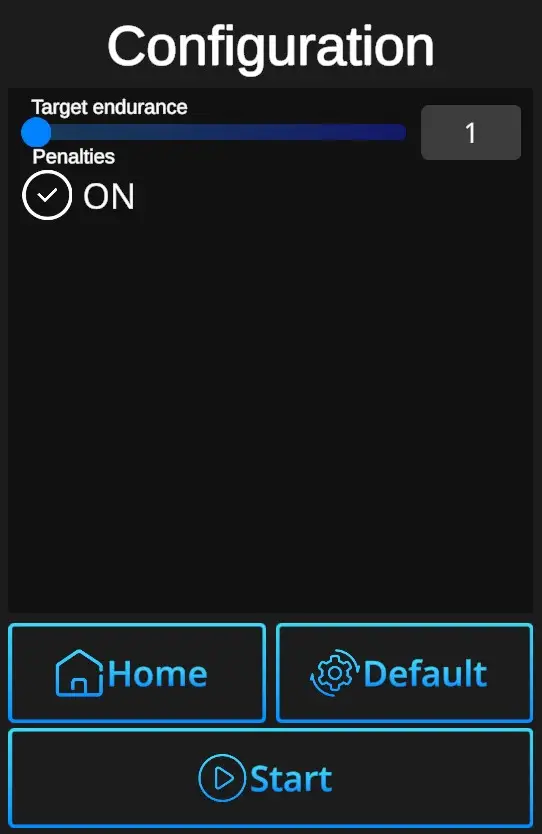
**Target Endurance** : Sets required number of hits to remove the target (1-5). There are two shoot targets and one no-shoot (unarmed) target.

---

<table border="1" id="bkmrk-drill-guide-appears-" style="border-collapse: collapse; width: 100%; border-width: 0px;"><colgroup><col style="width: 50%;"></col><col style="width: 50%;"></col></colgroup><tbody><tr><td style="border-width: 0px;">[![CQBDrillGuide.webp](https://docs.helioninteractive.com/uploads/images/gallery/2025-07/scaled-1680-/cqbdrillguide.webp)](https://docs.helioninteractive.com/uploads/images/gallery/2025-07/cqbdrillguide.webp)</td><td style="border-width: 0px;">Drill guide appears at the beginnig of each CQB drill, but only if the main setting -&gt; Home-Settings-Auto drill guide control is ON.

For experienced players Auto drill guide setting OFF would be satisfactory.

</td></tr></tbody></table>

---

**Penalties ON/OFF** : Penalties ON will add 1 second to the drill time for every missed target. Penalties OFF ignores the misses and records the elapsed time only.

**Default values** : In one click resets the scene to default setting - Endurance 1 + Penalties ON.

**Home** : Directs back to the Home page with the drill selection.

**Start**: Starts the drill. Note that the drill can also be started with a random shot at the scene. If it doesn't start at a random shot, go to Home page, open the Settings dialog, and check General setting 'Shoot to start' ON.