# Troubleshooting
# Camera is not in focus
### Symptoms
- Output of a camera is **blurred** in LATRAS Hub
- I can't get camera into focus
- Even after adjusting the focus ring on the lens camera is **not in focus**
### Before troubleshooting
- **Remove optical filter** from the lens.
- Ensure that the camera is properly connected to the computer through USB3 port.
- Start the camera in LATRAS Hub and enable Preview.
- Set camera gain so that the camera has visible output.
- Now, you should see camera **output in a large window.**
- Do not focus in darkness. It will be way easier to get camera into focus with indoor light.
### Camera description
[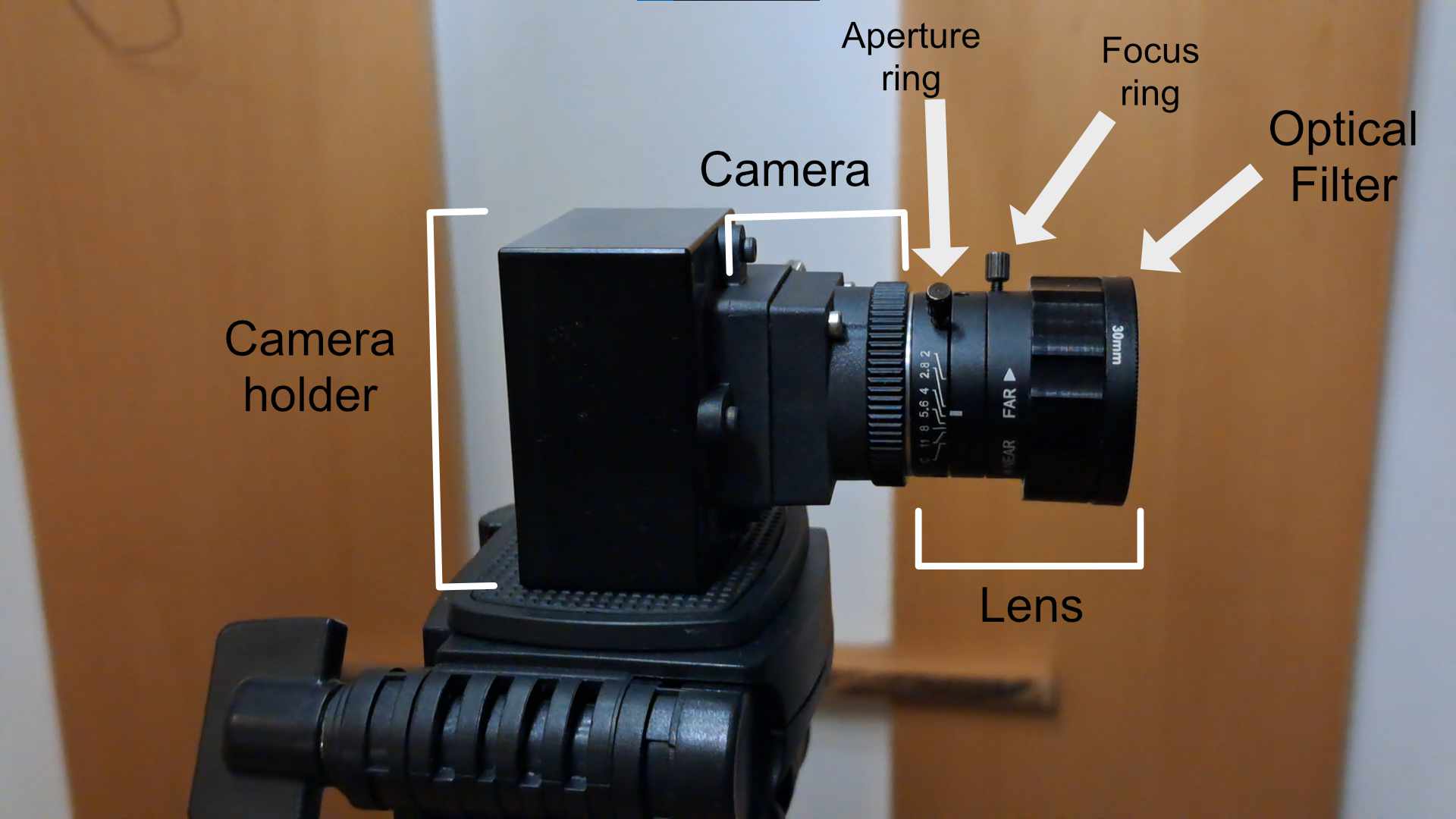](https://docs.helioninteractive.com/uploads/images/gallery/2026-01/cameradescription.jpg)
### Resolution
1. Rotate with the focus ring on the lens. This will change the camera's focus. Look at the main view in LATRAS HUB, the focus **change should be visible there right away**.
2. Check if the lens is **clean**.
3. Check if the lens is properly threaded into the camera. If not, thread it back in and go to step 1.
4. Take the camera and try focusing on everyday objects. Focusing against a white wall or a projection screen **can be very tricky**. If you manage to get into focus **try it again with your projection**.
# Inconsistent laser detection
### Symptoms
- I am shooting, but the shot count is not increasing.
- The detection stops in the middle of a scenario.
---
### Cause
This problem is usually explained by following cases:
- Camera gain is set improperly
- Computer does not have enough memory
- Computer does not keep up with the simulator
---
### Resolution
1. Try **increasing camera gain**, but do not overshoot. Output image should not be overexposed, but not completely black. Check our tutorial: [https://youtu.be/4PJ1UsyNxTY](https://youtu.be/4PJ1UsyNxTY)
2. Lower graphics settings in Range 1 or any other plugin. If you experience these issues we recommend dropping quality settings to Medium or Low. This can be done from the main menu in Range1 -> Settings
3. Open task manager(Ctrl + Shift + Escape) and check if there is enough system memory, This is especially problematic on systems with 8Gb of memory. If you are using over 80% of system memory, try turning off other processes that take up memory.
---
### Related problems
# No laser detection
May be caused by malfunction of laser device
Check the funktionality of laser:
**Never point directly into your or other people's eyes.**
- Red laser by pointing to a wall or other safe surface,
- IR laser by pointing to a running cellphone's camera - small flashes appear.
When the laser doesn't function - try changing batteries. If it doesn't help, contact the producer of the laser device for repair.
When the laser functions properly - see camera settings for help.
# Invalid rapid shooting sounds
When invalid rapid shooting sounds or single false hits appear (false detection):
Check the light condition in the room. The camera is capable to deal with wide range of conditions, but it needs to be properly set.
Dim ambient light, remove direct light pointed to the projection screen.
When dimming the room is not possible **lower the camera gain setting,** but not too much.
**Most common problems with gain setting:**
Hits are not detected or only some are - increase the Gain
Hits appear much lower than they should be - increase Gain
There are False hits or two hits per one shot - decrease Gain
# Camera is upside down
### Symptoms
---
### Cause
---
### Resolution
---
### Related problems