
Custom Drills Setup
Custom Scenarios and Drills is a module that extends the simulation set with an editor that helps to create personalized scenarios composed of custom, creatively edited images. The module is directly integrated into the LATRAS VSR console. This means that no additional application needs to be installed.
 |
Click on the Custom Drills button. |
Now dialog appears:
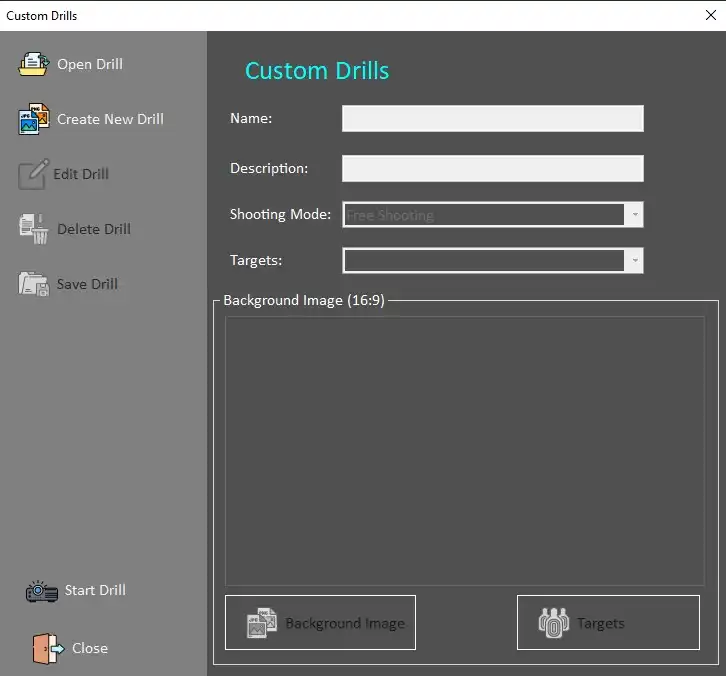
Open Drill - opens already defined and saved drill.
Create New Drill - builds a new drill from scratch.
Start by filling in the desired Name of the drill and Description of the Drill. Both lines need to be filled out in order to proceed.
Select Shooting mode: available options are
Free Shooting - no restrictions, no preset time limits
All targets down - all targets must be eliminated
10sec High Score - drill lasts 10 seconds, aim for maximum score within the time limit
Fast 20 Point - drills ends when 20 points are reached
10 for 10sec - 10 shots in 10 seconds drill
Targets
Custom Targets - select either predefined image and define your own drill conditions or load any 16:9 image and converet it into a target scene.
Precision Targets - shooting at a defined distance. The size of the target changes depending on the distance from the shooter.