
Appearing Targets

A straightforward marksmanship drill featuring group of stationary bullseye targets on a shelf appearing according to the selected configuration. Ideal for improving trigger control, aim, reaction, and speed.
Available means of configuration appear when the Appearing Targets drill is selected:
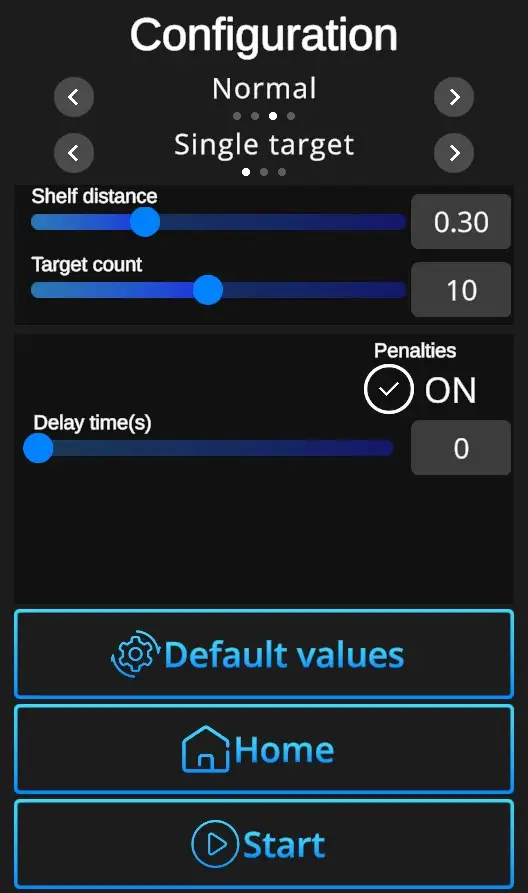
Difficulties to be selected from:
Custom, Easy, Normal, Expert - refer to Difficulties
Target options:
Single Target - Only one target at a time appears.
Multi Target - Multiple targets appear and can be shot in any order.
No-Shoot Target - Orange No-Shoot Target may appear during the drill.
Shelf distance - Can be adjusted in the Custom difficulty level, other levels are preset. Values 0-1, where 0 is the closest, 1 the furthest.
Target count - Number of targets to be shot in the drill. Can be adjusted in the Custom difficulty level, other levels are preset. (Easy 5 shots, Normal 10 shots, Expert 15 shots).
Default - In one click resets the scene to default Appearing Targets setting - Normal difficulty + single target.
Home - Directs back to page with drill selection.
Start - Starts the drill. Note that the drill can also be started with a random shot at the scene.