
Floating Targets
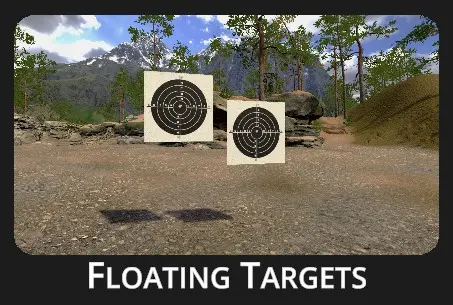 |
This drill tests your reflexes and accuracy under pressure. It pushes you to hit every target quickly and cleanly—misses aren’t an option.
It builds precision, speed, and decision-making—key skills for both competitive and tactical shooters. |
Drill Description:
Targets appear at a fixed distance, either hanging or floating within the scene. The objective is to eliminate all targets as quickly as possible without missing a shot. Points are awarded based on accuracy.
To increase the level of competitiveness, activate the Penalties ON option—each missed shot will add a 1-second time penalty to your final score, pushing you to balance speed with precision.
Depending on the selected mode, targets may appear all at once or one by one.
Configuration:
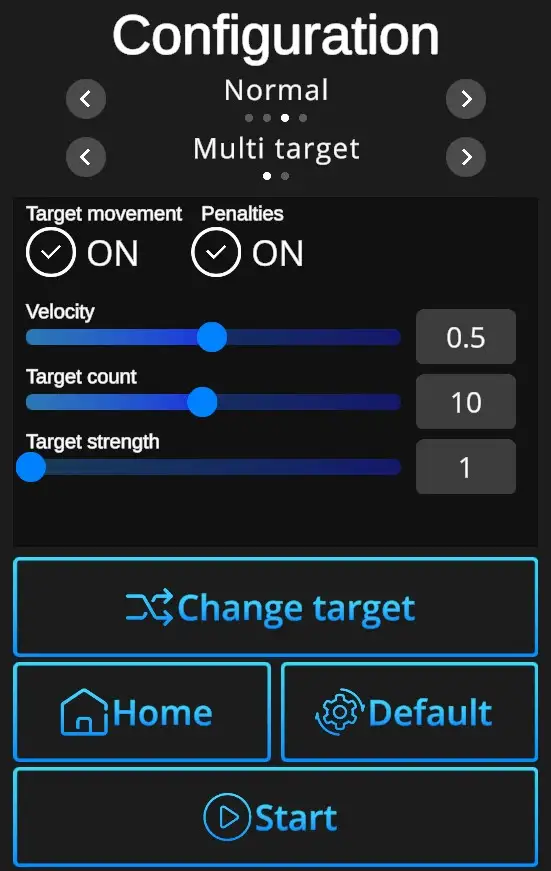
Difficulties to be selected from:
Custom, Easy, Normal, Expert - refer to Difficulties
Target options:
Single Target :Target: Only one target at a time appears.
Multi Target :Target: Multiple targets appear and can be shot in any order.
Target movement ON/OFF : Selection of scene with either fixed (no movement) or floating targets (random movement, floating, overlapping targets).
Penalties ON/OFF : Penalties ON will add 1 second to the drill time for every missed shot. Penalties OFF ignores the misses and records only elapsed time.
Velocity : Can be set from value 0 (slowest) to 1 (fastest). Can be adjusted in the Custom difficulty level, other levels have the velocity preset. (Easy 0,2, Normal 0,5, Expert 1,0).
Target count : Number of targets to be shot during the drill (1-20). Can be adjusted in the Custom difficulty level, other levels are preset. (Easy 7 shots, Normal 10 shots, Expert 12 shots).
Target strength : Indicates number of hits necessary to remove each target. Standard setting is 1, custom setting allows up to 5 hits per target.
Change target : Selects target type.
Default : In one click resets the scene to default Floating Targets setting - Normal Difficulty + Multi Target + Target Movement ON + Penalties ON + Target Count 10 + Velocity 0,5 + Target Strength 1.
Home : Directs back to page with drill selection.
Start: Starts the drill. Note that the drill can also be started with a random shot at the scene. If it doesn't start at a random shot, go to Home page, open the Settings dialog, and check General setting 'Shoot to start' ON.