
Quick Draw
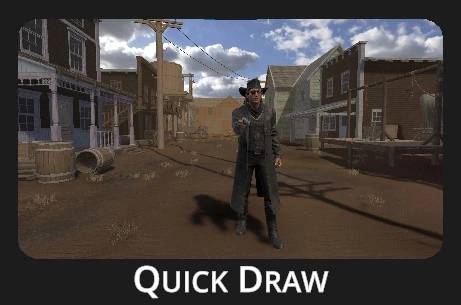 |
Face Cody the cowboy in a classic duel stance - when his arm moves to draw, so must you. Be ready, he gets quicker with each round!
Thrilling way to train focus, control, quick reaction time, weapon handling, and shooting accuracy. |
Drill description:
Cody the Cowboy is ready to challenge anyone to a duel. The settings allow you to choose the distance, difficulty mode, and other options. The principle is simple: the duel runs in rounds. Watch Cody closely—when he starts raising his gun, it's time to draw and shoot. If Cody is hit before he raises his gun, he loses the round and falls. With each round, his reaction time improves by fractions of a second. The drill ends when Cody raises his arm before he's hit.
Make sure you don't shoot too early! The drill will stop prematuraly and Cody won't be the one who loses.
Configuration:
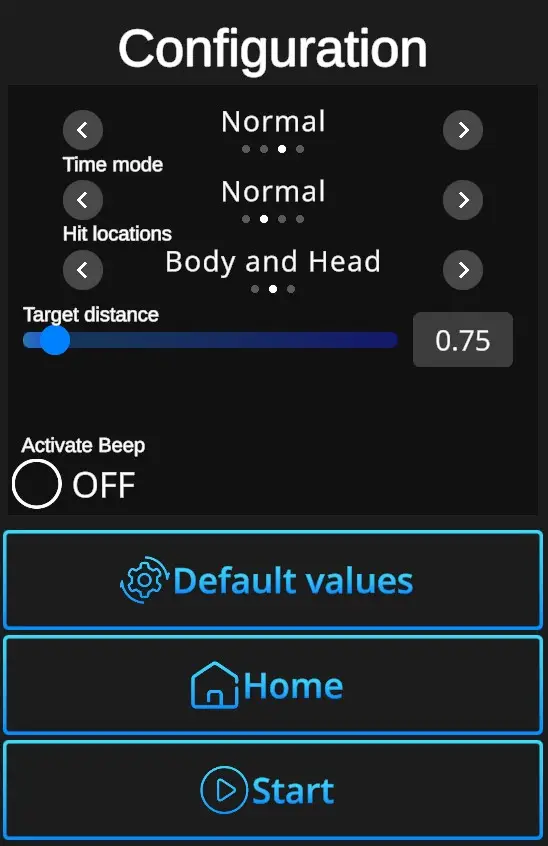
Difficulties: Custom, Easy, Normal, Expert - refer to Difficulties
Time mode: Define the available reaction time in the beginning of the drill.
Easy - starts at 3 seconds then each round gets quicker in decrements of 0,5s, 0,2s, 0,1s, and finally 0,05s.
Normal - starts at 2 seconds then each round gets quicker in decrements of 0,25s, 0,15s, 0,1s, and finally 0,05s.
Expert - starts at 1,2 seconds then each round gets quicker in decrements of 0,1s and 0,05s.
Insane - starts at 0,7 seconds then each round gets quicker in decrements of 0,05s.
Hit locations: Determines which parts of the cowboy's body count as valid hit areas — options include everything (head and body), head and body only, or head only.
Target distance: Sets the distance from which the cowboy shoots, adjustable in 0.05 increments within a range of 0.00 to 10.00.
Activate beep ON/OFF: Turning ON enables a beep sound when Cody begins raising the gun. Turning OFF disables the beep, leaving only a visual indication.
Default values: In one click resets the scene to default setting - Difficulty Normal + Time Mode Normal + Hit locations Body and Head + Target distance at 0,75 + Activate Beep OFF.
Home: Directs back to the Home page with the drill selection.
Start: Starts the drill. Note that the drill can also be started with a random shot at the scene. If it doesn't start at a random shot, go to Home page, open the Settings dialog, and check General setting 'Shoot to start' ON.