
Rail Targets
This shooting drill features rail-mounted moving targets arranged across multiple rows. Each configuration introduces unique challenges, such as varying target counts, speeds, and strategically placed barriers that partially obstruct lines of sight. Shooters must quickly adapt—tracking targets through gaps and around obstacles while maintaining precision. The drill is designed to improve target acquisition, movement tracking, situational awareness, and shot timing under dynamic conditions.
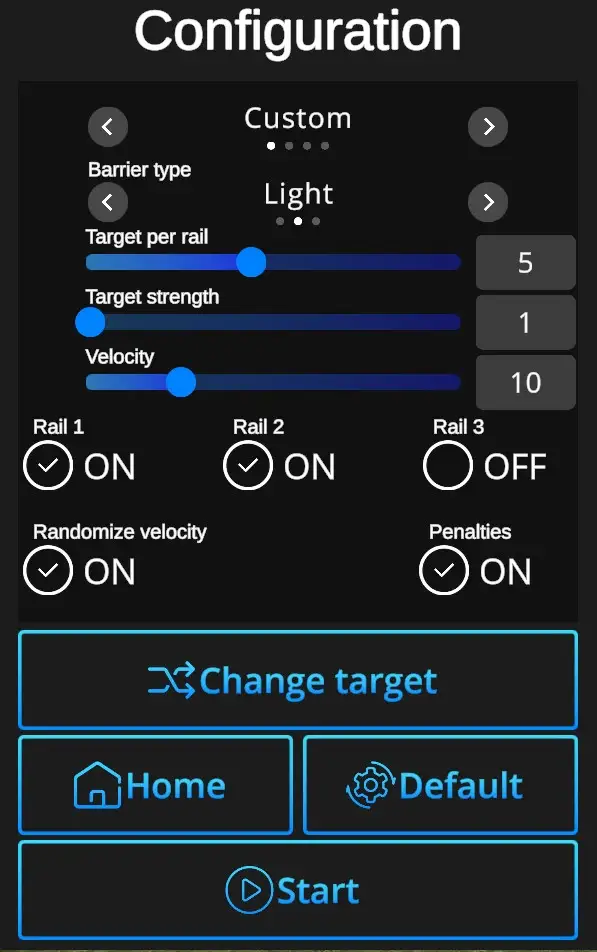
Difficulties to be selected from:
Custom, Easy, Normal, Expert - refer to Difficulties
Barrier Type:
None, Light, Heavy
Target per Rail - 1-10
Target strength - Indicates number of hits necessary to remove each target. Standard setting is 1, custom setting allows up to 5 hits per target.
Velocity - Can be set from value 0 (slowest) to 1 (fastest). Can be adjusted in the Custom difficulty level, other levels have the velocity preset. (Easy 0,2, Normal 0,5, Expert 1,0).
Rail 1, Rail 2, Rail 3 ON/OFF - Check how many rails per scene.
Randomize Velocity ON/OFF - ON Variable speed mode, OFF constant speed
Target count - Number of targets to be shot in the drill (1-20). Can be adjusted in the Custom difficulty level, other levels are preset. (Easy 7 shots, Normal 10 shots, Expert 12 shots).
Change target - Selects target type.
Default - In one click resets the scene to default Floating Targets setting - Normal Difficulty + Multi Target + Target Movement ON + Penalties ON + Target Count 10 + Velocity 0,5 + Target Strength 1.
Home - Directs back to page with drill selection.
Start - Starts the drill. Note that the drill can also be started with a random shot at the scene.