
Selection Targets
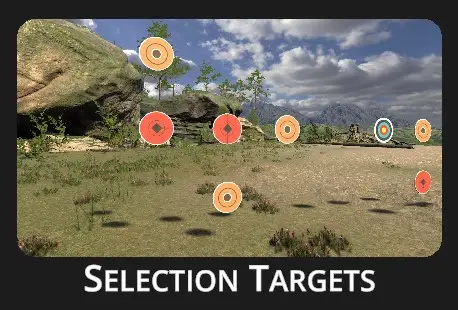
In the Selection Targets drill, the shooter’s objective is to hit all targets of a specific type. The drill consists of multiple cycles. At the beginning of each cycle, one type of target is displayed to the shooter. The shooter must then engage and eliminate all targets matching the shown type.
This drill helps develop target recognition, decision-making under pressure, and precision shooting. It also reinforces visual processing speed and situational awareness, essential skills for dynamic shooting environments.
Configuration dialog appears when the drill is selected:
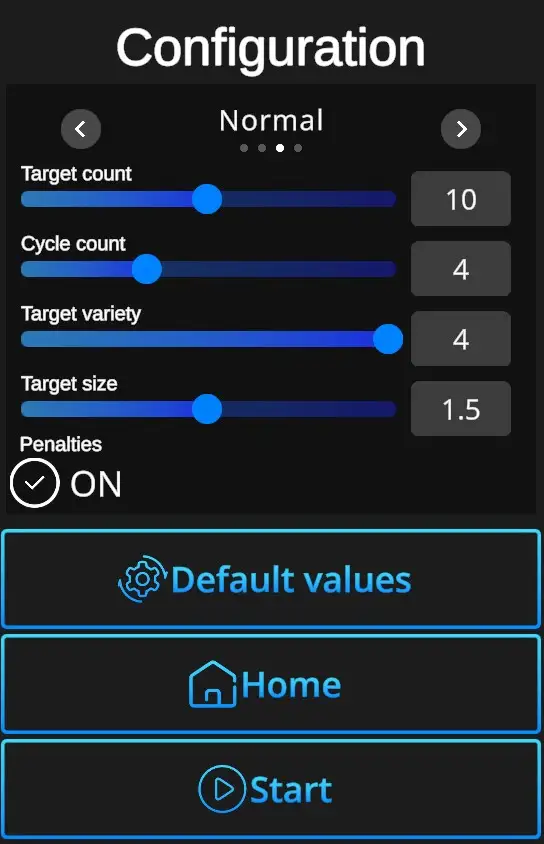
Difficulties : Custom, Easy, Normal, Expert - refer to Difficulties
Target count: Sets how many targets appear in one cycle (5-15).
Cycle count - Number of cycles in a single drill (1-10). Can be adjusted in the Custom difficulty level, other levels are preset. (Easy 3 cycles, Normal 4 cycles, Expert 4 cycles).
Target variety - Indicates how many target types can be encountered in the drill (2, 3, 4). Can be adjusted in the Custom difficulty level, other levels are preset. (Easy 3 targets, Normal 4 targets, Expert 4 targets).
Target size -Sets the size of targets in decimal increments (1,0-2,0). Can be adjusted in the Custom difficulty level, other levels are preset. (Easy 2.0, Normal 1.5, Expert 1.2).
Penalties ON/OFF - Penalties ON will add 1 second to the drill time for every missed shot and 3 seconds for every shot at incorrect target. Penalties OFF ignores the misses and incorrect hits, records only elapsed time.
Default values - In one click resets the scene to default Selection Targets setting - Normal Difficulty + Target Count 10 + Cycle Count 5 + Target Variety 1,5 + Target Size 1,5 + Penalties ON.
Home - Directs back to page with drill selection.
Start - Starts the drill. Note that the drill can also be started with a random shot at the scene.